Okta: login with Microsoft failed, Error Code: access_denied,

Okta Social Login Fails with ‘Transaction Expired - Error Code: access_denied’

Hi everyone,

I’m trying to implement Microsoft login via Okta for my application. Everything seems properly configured, but I’m running into the following error after the Microsoft login popup:

Error: access_denied
Description: Transaction Expired

I’ve double-checked the following:

  • :white_check_mark: Redirect URI is correctly registered in both Okta and Azure AD
  • :white_check_mark: Client ID & Client Secret from Azure AD are correctly set in Okta’s IdP integration
  • :white_check_mark: Tenant ID and well-known OpenID endpoints are configured properly
  • :white_check_mark: The application type is set to OIDC - Web, and I’m using the correct response type

Still, I hit this “Transaction Expired” error, and it looks like it fails right after authenticating with Microsoft.

My questions:

  1. What typically causes the Transaction Expired - access_denied error in this flow?
  2. Is there any session timeout or mismatch that might cause this between Microsoft and Okta?
  3. Could this be a result of slow redirects or CORS/session issues on localhost?

Any help or guidance from someone who’s solved this before would be greatly appreciated.

7- Error

Thanks in advance!

Facing similar issue

@anand.patel For your org, our logs indicate that the cause of this error is that the /token endpoint for this Identity Provider returned a 400 error back to Okta when we tried to complete Authorization Code flow.

You likely want to double check your IdP config to make sure all the values provided are correct, sometimes remaking it from scratch is the best way to ensure that.

I’m able to login with anand@kirithiv.onmicrosoft.com domain. but I’m not able to login with @algoshack.com domain why?
is there any change required from Okta/Microsoft configuration?

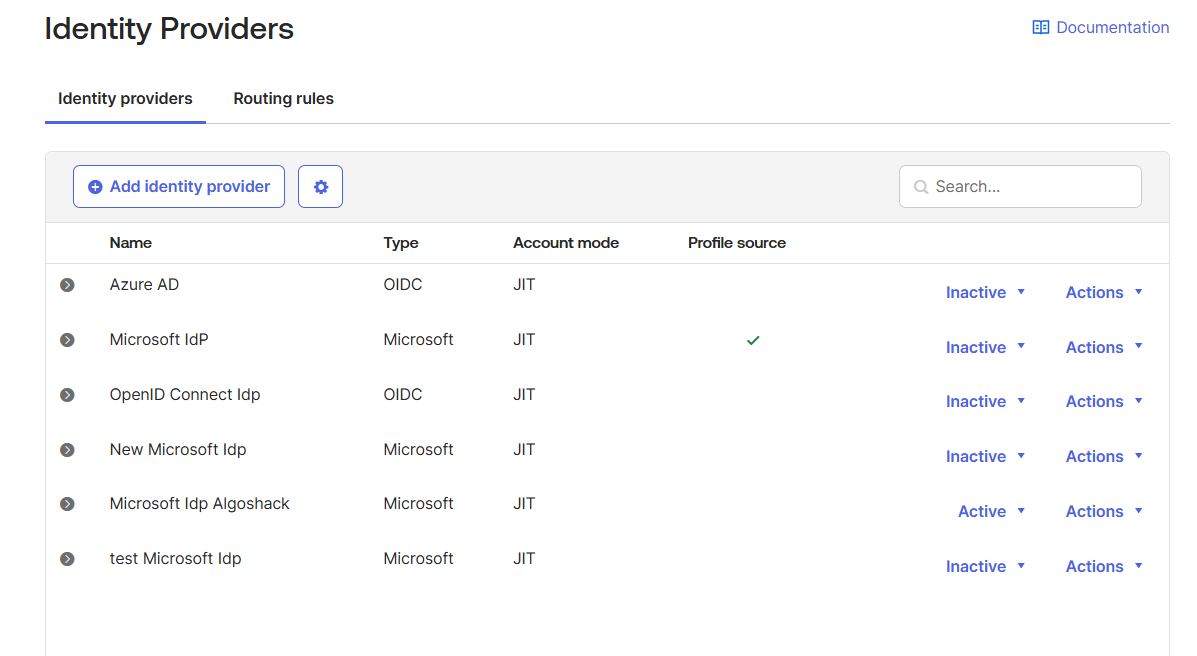
Do you have different Routing Rules configured for these domains, with each domain routing to a different IdP? I noticed you have multiple Microsoft IdPs in your org as well as a generic OIDC IdP, which is the one that was encountering the 400 error.

Please help me with above screenshots.

Are you using the Microsoft Social IdP (the pre-built one that you can select) or have you configured a Generic OpenID IdP to use Microsoft?

Issue is resolved. Thanks @andrea :slight_smile:

1 Like

This topic was automatically closed 24 hours after the last reply. New replies are no longer allowed.