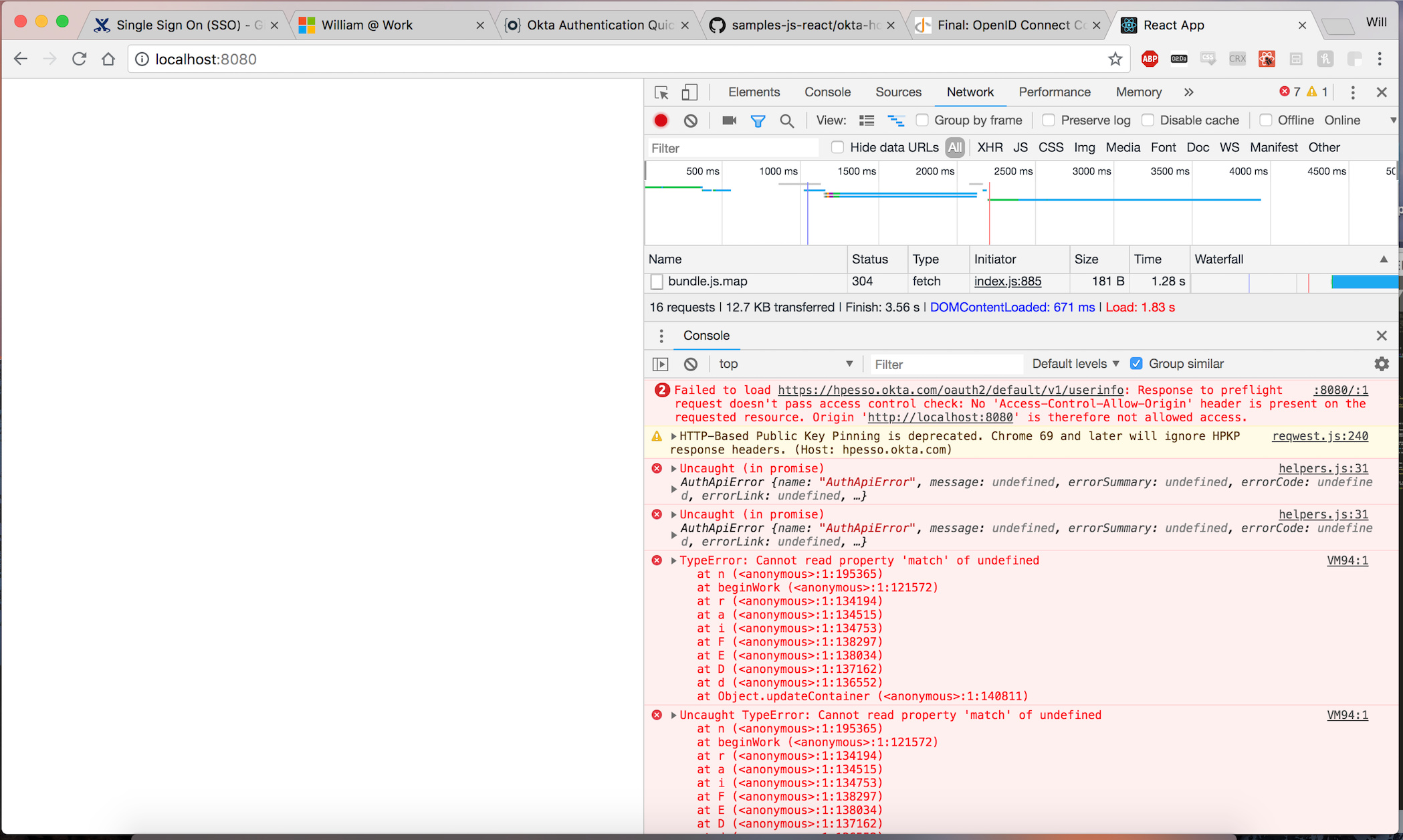
Hi, so my react.js client I got from okta shows a blank screen after I authenticate (successfully). Looking for help on how to fix this. I would really appreciate any guidance! I have no previous experience using react. Here are the steps I followed:
- Using Google Chrome
- Clear Cache and Cookies
- npm start react.js client using okta hosted login samples-js-react/okta-hosted-login at master · okta/samples-js-react · GitHub
- Turn on Google Chrome’s network inspecting tool
- Click Log-in, get to the sign in portal, I enter my credentials and click log-in
- Get a blank screen and these errors. Inspecting the HTTP headers I received I see I got my ID token and using jwt.io I verified it’s contents.
- I tried googling the Response to preflight request error, found this stack overflow post javascript - Response to preflight request doesn't pass access control check - No 'Access-Control-Allow-Origin' header - Stack Overflow
- The top stack overflow answer suggests turning off CORS, so I go here javascript - Disable same origin policy in Chrome - Stack Overflow
- I enter the following command in my terminal “open -a Google\ Chrome --args --disable-web-security --user-data-dir”
- I quit the app, close the tab, clear cache / cookies, and start everything up again and I still get the same error.