Hello forum.
I have some problems with understanding/testing Single Logout with OKTA.
According to the section 3.7 of the SAML specs - If there are multiple participants (other applications) in a session besides your application, and one of the other participants sends a LogoutRequest to the identity platform (IP) (the session authority), then IP will send a LogoutRequest back to all the session participants except the participant who sent the initial LogoutRequest .
So, am I understanding this correctly? After I set up SLO for my application:
If I log in to my application on two different browsers or computers using the same account via SAML,
And then log out from one of the browsers or computers,
The account on the other browser or computer will be logged out automatically?
After you setup SLO in your SAML apps, based on your setting Okta will send a POST or REDIRECT logout request to all the participating apps with/without session details based on your configuration. It is up to the apps to kill the sessions upon receiving the request (This step is not controlled by Okta).
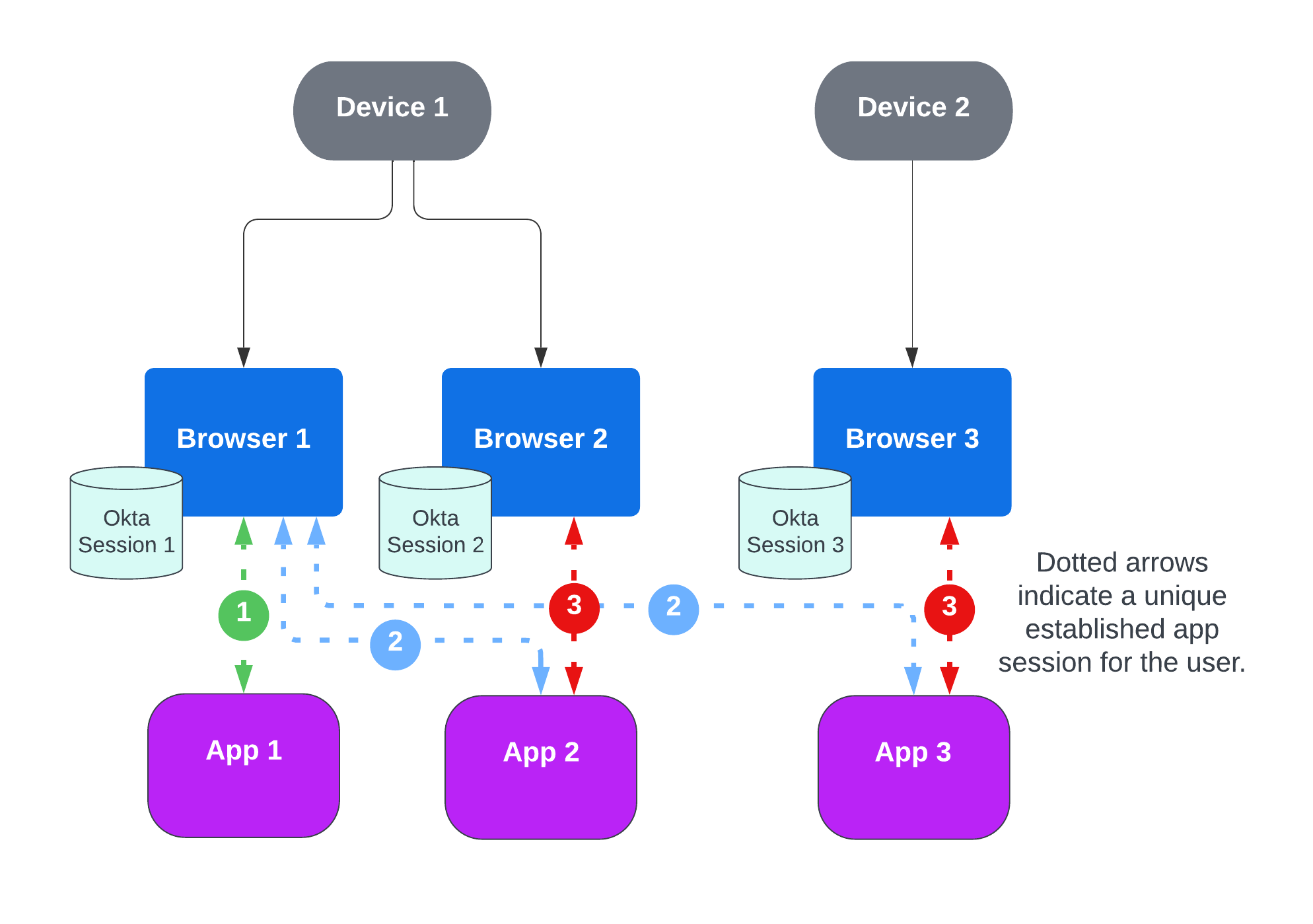
Note: Only Okta session 1 is terminated. Okta Sessions 2 and 3 are still active despite Apps 2 and 3 no longer having a valid session in Browsers 2 and 3. It’s up to the apps to kill the sessions for that user.
I think I answered this already. Let me rephrase my answer to see if it helps,
When one of the participating apps initiates logout, Okta will send outbound requests to the SLO endpoints of all the participating apps with an active session(even to another browser or device).
But automatically logging out is the part which Okta will not do. The app has to be the responsible entity to log users out on the other browser(s)/device(s) when SLO request is received by them.
Under Settings > Features > enable Front-channel Single Logout
For each SAML app you want to be participate in SLO, under Application instance > Single Logout > App logs out when and App initiates > enable the option and then enter all the details like URL, binding and session inclusion.
Looks like SLO is enabled and you have provided the right section where SLO has to be configured. This has to be done to all participating apps. Then you will start seeing system logs when SLO occurs.
Do you see calls to SLO endpoints of the participating apps in the window where logout is performed?
If yes, then the client app has to implement a way to end session in different browsers/devices based on the identifier like sid being sent during this call.
If not, may be the sessions in other browsers might not be considered active or potential misconfiguration. If you are testing against SPA without a server component, there might be no straight forward way to communicate the logout event from a different device/browser.
This is the part that we need: We need users who are logged in on multiple devices or browsers with the same account to be logged out everywhere after logging out from our application.
Currently, it only works if all logins occur in the same browser. By ‘it works,’ I mean we see an incoming logout request from Okta.
What should we do to ensure such incoming requests are triggered for other devices and browsers?
Okta does not make outbound calls to devices/clients during this logout flow. The calls are made to SLO endpoint configured in your app settings.
Lets say App A and App B has active sessions.
App A initiates logout by redirecting to end session endpoint
In the Okta logout screen, Okta calls appb.com/slo endpoint (this is your SLO endpoint configured in App B) inside an iframe
App B needs to communicate this to the client devices
For your current scenario, you can verify by looking at network logs when you perform logout and see if outbound calls are made to SLO endpoints of participating apps with active sessions.
You are correct. I’ve re-tested this on different devices and confirmed with the engineering team that the feature is designed to work only for applications within the same browser session.
My apologies for the incorrect information in my previous post.
To prevent future confusion, I have already reached out to the appropriate internal teams to have our official documentation updated to make this behavior clear.

 . That is why i received new session on every request.