“You are not allowed to access this app” returned even though everyone has access to OIDC App

I am an OKTA newbie. I am trying to run the simplest use case for a Spring Boot web app accessed using OKTA. I downloaded the sample: Okta Spring Security & Okta-Hosted Login Page Example.
https://github.com/okta/samples-java-spring/tree/master/okta-hosted-login

I followed the instruction for creating, via the OKTA Admin Console, an App Integration, using the defaults as instructed.

https://developer.okta.com/docs/guides/implement-grant-type/authcode/main/#1-setting-up-your-application.

I create an App Integration in the OKTA admin console with:

· OIDC - OpenID Connect

· Web App

· Allow everyone in your organization to access

· Enable immediate access with Federation Broker Mode

I run the Spring Boot Tomcat locally, select Login button and get directed to OKTA log-in pages and login in with ID and credentials. But I get

You are not allowed to access this app. To request access, contact an admin.

In the OKTA Admin Console, I can see my app has assignments “This app is implicitly assigned to users.”

I even tried assigning my user to the app as well as assigning the Everyone group to the app but when I log in (via the OKTA prompts) I still get “You are not allowed to access this app. To request access, contact an admin.”

What could I be doing wrong since I tried allowing everyone in org, the specific user, and the Everyone group to be assigned to the app?

Is there any way to see how the access policy is determining access?

What else can I try?

I know this is a simplistic question but I am frustrated that I cannot get this simple example from OKTA to work. Thank you for any help.
Hmm, do you happen to have an Authorization Policies assigned to this app that is denying access to these users?

Thank you for your help.

In my Application Integration, under the Assignments tab, I have:

This app is implicitly assigned to users
Immediate access is currently enabled with Federation Broker Mode for this app. As a result, user access is determined by app sign-on policies.

What other authorization policies do I need to look at? Wouldn’t the authorization policies for an app integration be listed under the app definition? Where else can I look?

In User Profile Policies → Email verification I turned off “Required before access is granted” but that did not correct problem.

you could try using the “Access Testing Tool” under the reports tab, select the app and choose a user and see what it generates in the results if you haven’t already tried that.

If you look at the application’s Sign On (in some orgs, its labelled Authentication) tab, you should see a section at the bottom showing which Authentication Policy is assigned (I misspoke earlier when I referred to them as Authorization Policies, this is what happens when you type too fast!).
Make sure that these users aren’t getting denied due to a rule in that policy.

I used the Access Testing Tool.
When I select Run Test, it shows that the user has access to the app. As I understand it, it does not tell me anything about a user using OIDC trying to access the app.

I am still running the sample okta-hosted-login app from OKTA
The web page has a ‘Login’ button. When I select it, the browser open the OKTA authenticate page. I can tell it is accessing the corret app since the client id is in the URL

broadcom-integrator-9795538 - Sign In

But I still get
You are not allowed to access this app. To request access, contact an admin.

How is the client secret passed to the OKTA IDP? That seems to be a possible problem.

How can Access Testing Tool show the how it the OKTA IDP determine access given the client id (and client secret?) passed to it?

Thank you

I have the correct Authentication Policy.
I can tell because I changed it from MFA to just password and the OKTA authenticate page responded accordingly. I did this to verify I had the correct Authentication policy.

Thank you for any help you can give me.

Any chance you are using a Custom Auth Server, and it doesn’t have an Access Policy Rule set up?

I would also suggest that you check the logs in the Okta Admin console, which will give you more insights into that error.

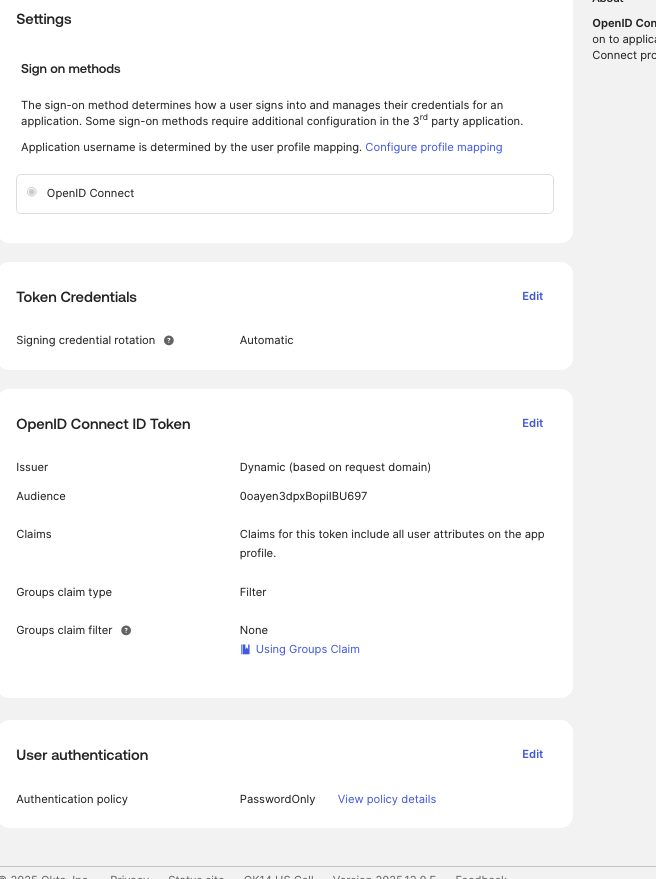
If I understand correctly, I set the Custom Authorization Server in App’s Sign-on settings. I have attached a screen shot of my App’s Sign-on settings. I did not set a custom auth server.

I looked at the logs in the admin console. I have inclued the info from the screen below. The log CSV is huge.

I see:
OAuth2 authorization request
FAILURE: no_matching_policy
default (AuthorizationServer)

OK, so I guess I need an auth policy. I did assign my user go the app in the Directory settings, as well as assigning the Everyone Goup to the app. What else do I need to do?

My log has 4 entries for me trying to access app.

Dec 19 15:24:07
MyWebApp3 (PublicClientApp)
192.19.161.250
OAuth2 authorization request
FAILURE: no_matching_policy
default  (AuthorizationServer)

Dec 19 15:24:07
Kenneth Shine (User)
192.19.161.250
User login to Okta
SUCCESS
Password  (AuthenticatorEnrollment)
OpenID Connect Client  (AppInstance)
Dec 19 15:24:07

Kenneth Shine (User)
192.19.161.250
Authentication of user via MFA
SUCCESS
Kenneth Shine  (User)
Password  (AuthenticatorEnrollment)

Dec 19 15:24:01
Kenneth Shine (User)
192.19.161.250
Evaluation of sign-on policy
CHALLENGE


OpenID Connect Client  (AppInstance)
Default Rule  (Rule)
3 more targets

The no_matching_policy can either be due to this - Okta Help Center (Lightning)

or this -

1 Like

I created an access policy and was able to successfully run the application.

As I said, I was following the instructions in the beginner’s example listed below.
Why didn’t the instructions include the important information that you needed an access policy since an AP is required. I wasted many hours because of this.